Introduction
As a software engineer and beekeeper I look for more concrete data that I can use to make better management decisions. My day job keeps me exploring ways to improve the data, store it for long-term use, and finally mine it for useful trends. I started using Broodminder devices with my first colony, a single temperature (model TH) sensor. Since that initial hive, I have accumulated many more sensors, to where each of my apiaries has a hub and each hive has at least a temperature sensor.
The problem
The main issue I have with Broodminder devices is not the hardware. Broodminder has done a great job with the in-hive sensors. They are compact, efficient, and unobtrusive to the beekeeper and (I assume) bees. My dissatisfaction is with the UI/UX for mybroodminder.com and the Bees app. The Bees app for me, across several iOS and Android devices, crashes depending on the workflow. Very rarely will it actually work an entire session for me. That makes it feel clunky, old, and like it doesn’t work well for this engineer. In my opinion, it needs to be modernized. So, since I view the data as MY data, being collected and stored in the cloud, I should be able to be happy with the visualizations.
A friendly note to Broodminder Inc.: I mean no offense by this post and believe you’ve created some excellent in-hive sensors! For that alone you have me locked as a customer who has purchased dozens of devices and will probably purchase dozens more. While not the quickest, your email support has been good to work with and has resolved issues well. And the personal touches you have with order fulfillment, the extra wrappers added to my orders when ordering them, and the no hassle warranty replacements have been greatly appreciated and show an honest desire to help your customers. I have, and will continue to pay for a Broodminder membership yearly to continually support your efforts and small business. My main grievance has been that both the website graphing visualizations and iOS/Android apps (I’ve used both) are lacking. I’d love to see the experience become more responsive, easier to use, and really a pleasure to dig into in the apiary. Until then, I’ll mainly use this code. My offer: In the future if you need someone to help develop, QA new versions (beta test), or test your API, please /contact me, I’d be happy to help gratis.
My solution
Collecting the beacons
Broodminder devices broadcast telemetry as BLE beacons that are then collected via a Hub and shipped to their cloud which uses Google Cloud (Firebase, Firestore, etc.). I decided to create a BLE harvest utility written in Rust that works on macOS, Linux, and small energy-efficient IoT development devices that can live in an apiary. These devices are low powered and sleep for most of the day. They wake up every N minutes and harvest all the BLE beacons from Broodminder devices seen during a 30 second window.
The ingest pipeline and dashboard
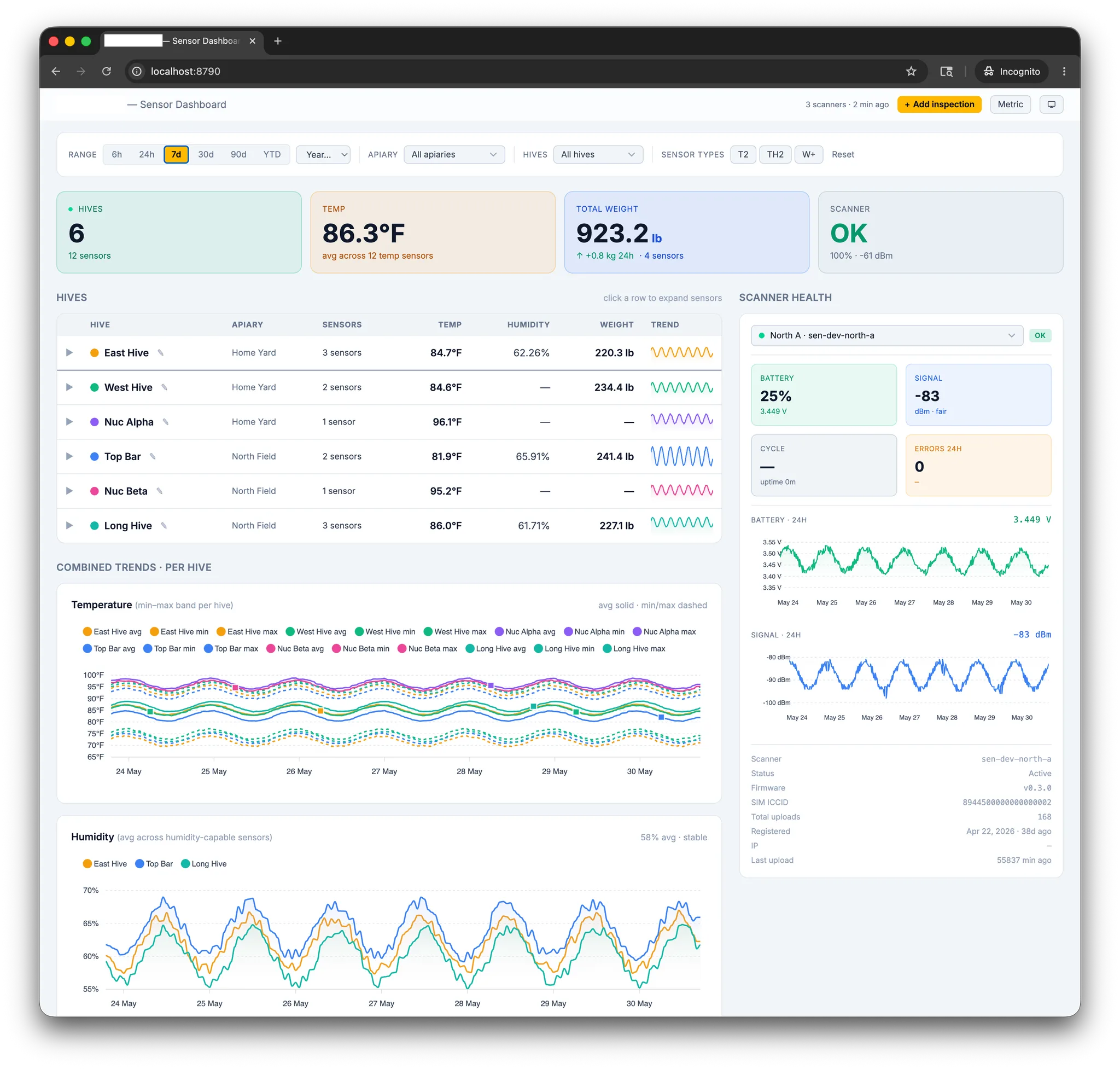
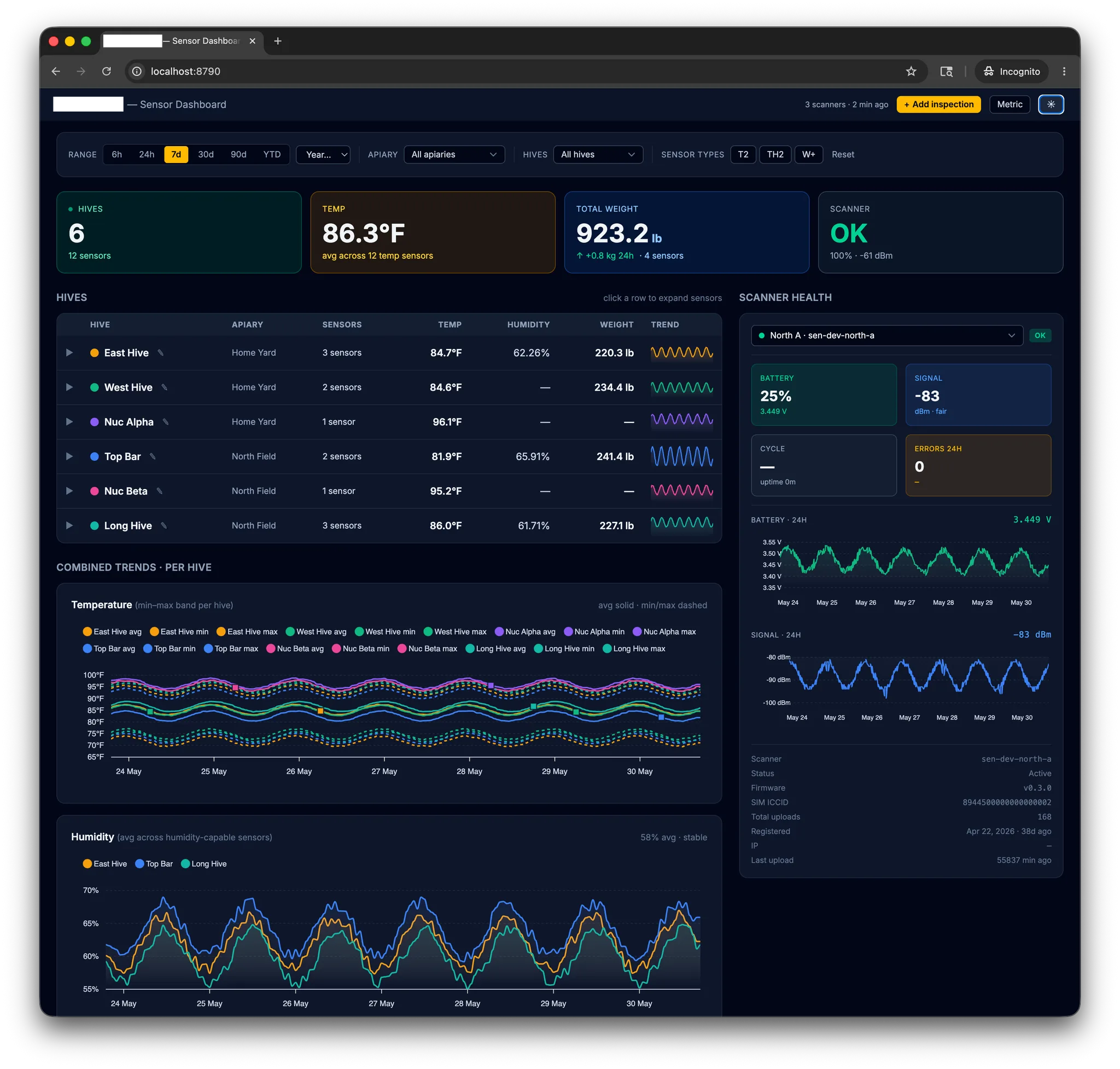
This data is collected and batched on the scanner gateway and pushed via the sensors-ingest pipeline to a Cloudflare Worker by an API POST to /ingest/readings and stored in Cloudflare D1. The web dashboard (Hono + TypeScript + Zod + Drizzle D1) is then accessed via Clerk for authentication on a separate dashboard Worker that queries D1 via an /api/ endpoint and the graph is displayed to the authenticated user. The graphs are separated by apiary.
Tiers, safeguards, and backups
All can be accomplished by using the Clerk and Cloudflare Free Tiers. If on a paid Workers plan, additional protection can be added by creating a kill switch that watches writes via Cloudflare KV and takes the ingest pipeline or dashboard offline to avoid excessive billing. Backups can even be orchestrated using Cloudflare R2 as well.
Using the sensors-ble-scan method I have created in conjunction with mybroodminder.com gives me a powerful way to both view and take control of my data.
The hardware
For current development I have used a cheap and common, off-the-shelf development board, a Lilygo T-SIM7080G-S3, which is an ESP32-S3 + SIMCom 7080G LTE-M modem. Anyone who knows IoT devices knows cellular modems on these devices can drain a battery quickly.
| Component | Current Development Boards | Cost |
|---|---|---|
| Compute | Lilygo T-SIM7080G-S3 (ESP32-S3 + 7080G LTE) | ~$30 |
| Cellular | Hologram.io Hyper Global SIM | $0.03/MB |
| Power | Molicel P30B 18650 3000mAh 30A Battery | $5.99/ea |
| Enclosure | Hammond 1554C2GYSL Enclosure, mounted in apiary | $16.00/ea |
I am also experimenting with additional hardware to optimize for the lowest power drain possible. The cellular modem is by far the biggest drain to the system. Currently, only the Lilygo is working.
| Component | Future Boards | Cost |
|---|---|---|
| Compute | XIAO ESP32-C3, nRF52840, Walter ESP32-S3 LTE-M | $20-$70 |
| Cellular | 1nce.com 500MB 10-yr flat-rate SIM Card | $15.00/flat |
| Power | Voltaic Solar 6v + 18650 or LiFeP04 & Heating Pad | Still researching |
| Enclosure | Hammond 1554C2GYSL Enclosure, mounted in apiary | $16.00/ea |
The data path: BLE to LTE-M
My custom ESP32 firmware runs a simple loop. Scan -> parse -> buffer -> flush. The board wakes up, listens for any BLE advertisements from Broodminders within range, parses what it heard, holds the readings in RAM, then once per cycle it lights up the LTE-M modem and ships the whole batch off to the ingest Cloudflare Worker. After that the modem powers all the way down and the ESP32-S3 drops back into deep sleep until the next interval (currently every N minutes).
The number of steps matters, since every step I can cut saves power. With a single 18650 battery, it could last only a matter of days or possibly weeks into months.
Scan. The ESP32-S3 radio runs passive scanning with no connection attempts. Broodminders advertise on the standard BLE channels, so an active scan would only waste energy soliciting SCAN_RSP frames the sensors do not send. A 20 to 30 second window catches every sensor in range at least once at the default 5-second advertising cadence, with a small margin for channel collisions.
Parse. Each advertisement is a 21-byte manufacturer-specific payload prefixed with Broodminder’s company ID 0x028D. The parser pulls the model byte, then decodes temperature, weight, humidity, battery, and (on T2/TH2 models) the SwarmMinder state code. The parsing crate is #![no_std], so the exact same code runs on the native CLI on macOS and on the ESP32-S3 with bit-for-bit identical output. That parity and Claude are what made firmware iteration tolerable: reproduce a decode bug on the laptop, fix it in one place, ship to the device.
Buffer. Readings accumulate in RAM as JSON-ready records. There is no reason to wake the modem more than once per duty cycle, because lighting up the SIM7080G is the energy-expensive operation by an order of magnitude. A cold start, cellular network registration, PDP context activation, and the TLS handshake together burn more energy than the entire BLE scan window.
Flush. When the scan window closes, the modem boots, attaches to LTE-M, opens one HTTPS session, and POSTs the buffered batch to the ingest Cloudflare Worker. On a 200, the firmware powers the modem down with AT+CPOWD=1 (graceful shutdown, I found the SIM7080G is unforgiving about hard kills) and deep-sleeps. On a failure, the batch is retained in RTC memory and retried next cycle with a bounded backoff, so a stuck cell tower will not drain the battery overnight.
The whole point of doing it this way is the asymmetry for battery preservation. The BLE half is cheap, the cellular half is expensive, so I shaped the firmware to wake the modem once per cycle and pack as many readings as I could into that single upload.
The Broodminder advertisement format
Broodminder publishes the packet spec in Appendix B of their User Guide (v4.50 is what I have decoded against). The community has been chipping away at the format for years, and the two reference implementations I leaned on were dstrickler/broodminder-diy, the 2018 reverse-engineering effort, and sandersmeenk/home_assistant-broodminder, a Home Assistant integration that overlaps a lot of the field decoding. My own decoder currently lives in a private repo under crates/ble-parser, with 75+ tests pinning down each model variant. I plan on opensourcing it soon. (Read that as months, not days/weeks).
Every Broodminder advertisement is a standard BLE AD structure with type 0xFF (manufacturer-specific data), prefixed by Broodminder’s Bluetooth SIG company ID 0x028D in little-endian:
AD length │ AD type │ company ID LE │ Broodminder payload (21 bytes)
   1 B    │  0xFF   │   0x8D 0x02   │          21 B
The payload itself, after the company ID, is 21 bytes laid out as follows:
| Byte(s) | Field | Applies to | Notes |
|---|---|---|---|
| 0 | Model byte | all | See model lookup below |
| 1 | Firmware minor | all | e.g. 21 means .21 |
| 2 | Firmware major | all | Combined as "major.minor" for display |
| 3 | Realtime temp LSB | current models (47+) | Pairs with byte 9 (MSB) |
| 4 | Battery % | all | Clamped 0 to 100; raw > 100 reported as 100 |
| 5-6 | Sample counter | all | 16-bit LE, wraps at 65535 |
| 7-8 | Avg temperature raw | all | Formula depends on model generation |
| 9 | Realtime temp MSB | current models (47+) | Pairs with byte 3 (LSB) |
| 10-11 | Weight left raw | weight models | Sentinels 0x7FFF, 0x8005, 0xFFFF mean “no reading” |
| 12-13 | Weight right raw | weight models | Same sentinels |
| 14 | Humidity % | TH, TH2 only | Clamped 0 to 100 |
| 15-16 | Weight left 2 raw | 4-cell models | Only if payload >= 19 B |
| 17-18 | Weight right 2 raw | 4-cell models | Only if payload >= 19 B |
| 19 | Swarm state OR realtime weight LSB | T2/TH2 (swarm), W+ (weight) | Same offset, different semantics |
| 20 | Realtime weight MSB | current weight models | Only if payload >= 21 B |
Byte 19 is the field that tripped me up a bit. On T2 and TH2 it carries the SwarmMinder state code, and on W+ and the other current weight models it carries the realtime-weight LSB (Least Significant Bit, or the smallest weight change a sensor can detect). Same offset in the packet, two completely different fields, clarified by the model byte at offset 0. That kind of overload is the sort of thing you discover by reading other people’s parsers, not by guessing… I leaned heavily on others for that work.
Temperature has two formulas, picked by model generation:
Legacy (T=41, TH=42, W=43):
    temp_c = (raw / 65536.0) * 165.0 - 40.0       # SHT-style scaling

Current (T2=47, W+=57, TH2=56, ...):
    temp_c = (raw - 5000) / 100.0                 # centi-Celsius offset
Weight uses one formula across all weight models:
weight_kg = (raw - 32767) / 100.0with sentinel raw values 0x7FFF, 0x8005, and 0xFFFF meaning the load cell has no valid reading. For 4-cell scales (W3, DIY), the total is the sum of all four cells; otherwise it is left + right.
Humidity is a straight percentage on byte 14, present only on TH and TH2.
The model byte at offset 0 is the disambiguator for the whole packet:
| Byte | Name | Temp formula | Humidity | Weight | Notes |
|---|---|---|---|---|---|
| 41 | T | legacy | no | no | First-generation temperature-only |
| 42 | TH | legacy | yes | no | First-generation temp + humidity |
| 43 | W | legacy | no | 2-cell | Legacy weight scale |
| 47 | T2 | current | no | no | Also publishes swarm state |
| 49 | W3 | current | no | 4-cell | 4-cell scale |
| 52 | SubHub | current | no | no | Gateway device |
| 54 | Hub4G | current | no | no | Cellular gateway |
| 56 | TH2 | current | yes | no | Temp + humidity + swarm state |
| 57 | W+ | current | no | 2-cell | Most common scale in my apiaries |
| 58 | DIY | current | no | 4-cell | Hobbyist variant |
| 60 | HubWF | current | no | no | WiFi hub variant |
| 63 | BeeDar | current | no | no | Acoustic swarm detection |
For the SwarmMinder state codes on byte 19 (T2 and TH2 only), the interesting values are 0x29 (swarm event detected) and 0x40 (active swarm-event logging). Everything else is the state machine churning: 00s are stopped, 20s are monitoring, 40s are logging, 60s are post-swarm waiting. The full state table will live in the ble-protocol doc in the scanner repo when released.
Unknown model bytes round-trip through the parser as "Unknown" with the raw byte preserved, so a new Broodminder model can ship and the firmware will keep collecting raw packets until I get around to decoding it.
Backend ingestion
Once the firmware ships its batch, something on the other end has to receive and store it. If you know me, you know I’m a big fan of Cloudflare’s edge compute (cheap, fast, and the Worker model fits a tiny endpoint like this perfectly), so the ingest endpoint is a Cloudflare Worker. The Lilygo POSTs JSON to it, the Worker validates the auth token in the header, and then it writes the rows to a D1 database. Each reading is its own row, indexed by sensor MAC and timestamp, which makes the per-hive queries on the dashboard side trivial.
Auth is a shared secret sent in the request header. Nothing fancy. I rotate it often, more out of habit than out of any real threat model (there is nothing valuable in my hive telemetry except to me, and even then mostly only when something is going wrong). Regardless, I have backups. The Worker rejects anything without the right header before it ever touches D1, which keeps the random internet noise out of the database.
Graphing
Finally coming to the problem I wanted to fix: I built a small dashboard on top of the D1 database. It finally lets me see the data the way I want to visualize it. The dashboard is another Cloudflare Worker, reads directly from D1, and renders per-hive charts for temperature, weight, humidity, and brood-pattern signals. One chart per metric per hive (and per sensor, since most of my hives have more than one).
The chart I look at most is weight followed by temperature, looking for markers of sudden drops or spikes in temperature. A sudden weight drop is almost always a swarm event (seeing half your honey production fly away for the year is not a good feeling) or beekeeper manipulation of supers. I would rather get a heads-up from a chart at 9am than walk out to the apiary that afternoon and discover a bivouacked swarm I have to collect. That’s just poor management.

AI assistance
I’ve iterated quickly, reviewed thousands of lines of code, caught errors, modified code, and read endless documentation regarding each component in the chain. Claude has earned its keep for sure by:
- Completing deep research and iterating on the BLE parser when the advertisement format documentation was thin
- Building the initial parser and firmware, then debugging the modem state, especially the AT command strings for the SIMCom, which saved me hours
- Generating the dashboard code from a one-paragraph spec and a substantial system of guardrails
- Iterating on almost every layer of the stack faster than I could have alone
Cost and limitations
This is cheap, but it is not free, and a few things have come with the territory.
Per-device hardware. Adding up boards, batteries, and enclosures, each node in an apiary costs me right around $50-60 to build, give or take a SIM. That compares quite well to what Broodminder charges for their own 4G Hubs, but it still adds up when you have several apiaries and more than one node per apiary, like I do. I still recommend purchasing hubs and sensors from Broodminder. They are a good company and deserve the support. But if you are a DIY-er like myself, then perhpas you can use this.
Cellular data. Hologram is metered by the MB and my nodes ship pretty small payloads (a typical scan window’s worth of decoded readings is well under a kilobyte once serialized to JSON depending on the apiary density), so the data side of the bill is genuinely cheap, in the dollars-per-year range per device. I currently have a limit of 200MB a month (200MB * $0.03 == $6.00/mo) at which point I decide whether or not it’s worth continuing the test. Where it adds up is the per-SIM monthly fee. If I use $6/mo per apiary across 6 apiaries, then I’m looking at $36/mo or $432/year… that’s a non-starter. 1nce has a $15 flat-rate 500MB/10-yr SIM in their lineup which is appealing for that reason (but is still $0.03/MB). I am planning to migrate a couple of nodes over to compare network performance and dead zones when it attaches to one of the major carriers. The single best thing is to tune the duty-cycle up to 30 minutes so there are only 48 ingest POSTs daily, which saves a considerable amount of money but opens up for slower response time to issues in the apiary.
Cellular dead zones. This is the one I cannot solve with software. Several of my apiaries are at the actual edge of LTE-M coverage, and when the modem cannot register, the node just retains its batch in RTC memory and tries again next cycle. That works fine for short outages, but if a tower is down for a day or two the buffer fills up and I start losing the oldest readings. I have not lost a critical reading yet. But I know it is coming and it’s another problem to solve, possibly with onboard storage.
Battery life. The whole architecture is shaped around stretching a single 18650 as far as possible, but the firmware can only do so much. Lithium-ion cells lose capacity in cold weather, and Utah winters routinely drop into the teens or single digits at most of my apiary elevations. At my higher elevations, it drops into the single- or double-digit negatives. A 3000mAh cell rated for 25C does not deliver 3000mAh at -5C. The solar plus heating-pad combo in my future-hardware table is partly an answer to this, but it is still on the bench to work on once I have time.
Where to go from here
I have a never-ending list. Some of these are next-up, some are someday, but they all live in the same file.
Open source the firmware. All of the code (parser, firmware, ingest worker, dashboard) currently lives in a private repo. I have been iterating fast enough that I have not wanted to commit to a license or a maintenance promise yet. Once the schema settles and the firmware has been running long enough that the rough edges are out, I will open it up. If you are a beekeeper who reads code and you want a head start, drop me a note and we can discuss access or release timeline.
LoRa-bridged apiaries. Two of my apiaries have multiple hives in a fairly small footprint, and there is no reason each apiary needs its own LTE-M radio. A single gateway node with cellular plus a small LoRa mesh under it would cut both hardware cost and cellular cost. The LoRa side is on the list of experiments.
Multi-sensor fusion. Hive telemetry is more useful when I can correlate it with what the environment was doing. External temperature, recent rainfall, barometric pressure, what is blooming in the area, all of it helps me read the in-hive numbers with more context. Right now a sudden weight drop is essentially a swarm-or-robbing binary. With richer environmental data it could be “weight drop on a cool morning after a week of rain probably means robbing, not a swarm,” and that is a much more useful signal. In the near-term I plan to integrate a per-apiary Tempest weather station harvester (they have a nice API that I am already using for another project) to enrich the data to catch additional trends.
Conclusion
This started with frustration over visualizations in an app that would crash on me, and it turned into a fun project creating a pipeline I actually enjoy using. The hardware was never the problem. Broodminder’s sensors are excellent and I will keep buying them. What I wanted was to own the whole path, and the data, from the hive to the graph, and now I do: BLE beacons in the apiary, an ESP32-S3 harvesting them over LTE-M, a Cloudflare Worker catching each batch into D1, and a dashboard built the way I want to read it.
It is far from finished, and a few parts of it may never be. Battery life in a Utah winter, cellular dead zones at the edge of coverage, and the per-SIM economics across six apiaries are all still open problems I am chipping at. But it is cheap, and the data is finally mine to slice however I want, give or take the occasional cumbersome CSV download from Broodminder.
If you are a beekeeper who reads code, keep an eye out for me to open source this once I feel confident it’s up to my production standards. Until then, thank you to the contributors who reverse-engineered the packet format long before I showed up, and thank you to Broodminder for building hardware worth all this trouble.